Our internal AI chat (chat.aithyra.at) has been upgraded with several powerful new models. This post gives a short overview of what’s new, how the models compare, and when you should use which one.
New Chat Models
The following models have been added to the OpenWebUI instance:
- GPT 5.1
- Gemini 3 Pro
Both are high-end general-purpose models. In terms of quality and capabilities, GPT 5.1 and Gemini 3 Pro are roughly on the same level as Sonnet 4.5. In practice this means:
- Very good reasoning on complex or “fuzzy” problems
- Strong performance on longer texts, planning tasks, and code understanding
- More robust answers on ambiguous questions
GPT 5.1 is also relatively fast for such a powerful model, so it’s suitable when you need strong reasoning without waiting too long for results.
When to Use Which Model
To keep usage efficient and fast for everyone, please choose models according to your task:
- For simple, everyday tasks (short emails, basic text rewrites, quick summaries, straightforward explanations):
- gpt-oss (on‑prem, privacy-friendly)
- mistral-medium-latest
- GPT 5.1 Chat Latest
- For complex or business‑critical tasks (long reports, architectural decisions, complex code review, multi-step planning):
- GPT 5.1
- Gemini 3 Pro
- Sonnet 4.5 (still a strong option and good reference)
- Kimi K2 Thinking
- Qwen3-VL (our strongest on-prem model)
A simple rule of thumb: start with gpt-oss or mistral-medium-latest for routine work; switch to GPT 5.1 / Gemini 3 Pro / Sonnet 4.5 when things get non‑trivial.
New Image Model: “Nano Banana Pro”
We have also integrated a new image generation model:
- Nano Banana Pro (based on Gemini 3 Pro)
Nano Banana Pro supports advanced image workflows directly inside OpenWebUI:
- Multi-image composition: Use up to 14 input images to create a combined or transformed result.
- Image editing: Modify existing images (crop, change colors, adjust style, add/remove objects, etc.).
- Regeneration & variations: Take a previously generated image and ask the model to refine, extend, or change it.
Because Nano Banana Pro is built on Gemini 3 Pro, you get strong “understanding” of the images: it can work with content and structure, not just pixel noise, which makes edits more controllable.
How to Use the New Models in OpenWebUI
In chat.aithyra.at, you can select models per conversation or per message:
- Start a new chat and select the desired model from the model dropdown (e.g. “gpt-oss”, “GPT 5.1 Chat Latest”, “Gemini 3 Pro”).
- For image tasks, choose Nano Banana Pro and:
- Attach up to 14 images (screenshots, diagrams, photos, …).
- Describe what you want to generate or change.
Note: Please continue to avoid sending confidential or personal data to any models that are not explicitly marked as on‑prem. For privacy‑sensitive content, use gpt-oss wherever possible.
Example Use Cases
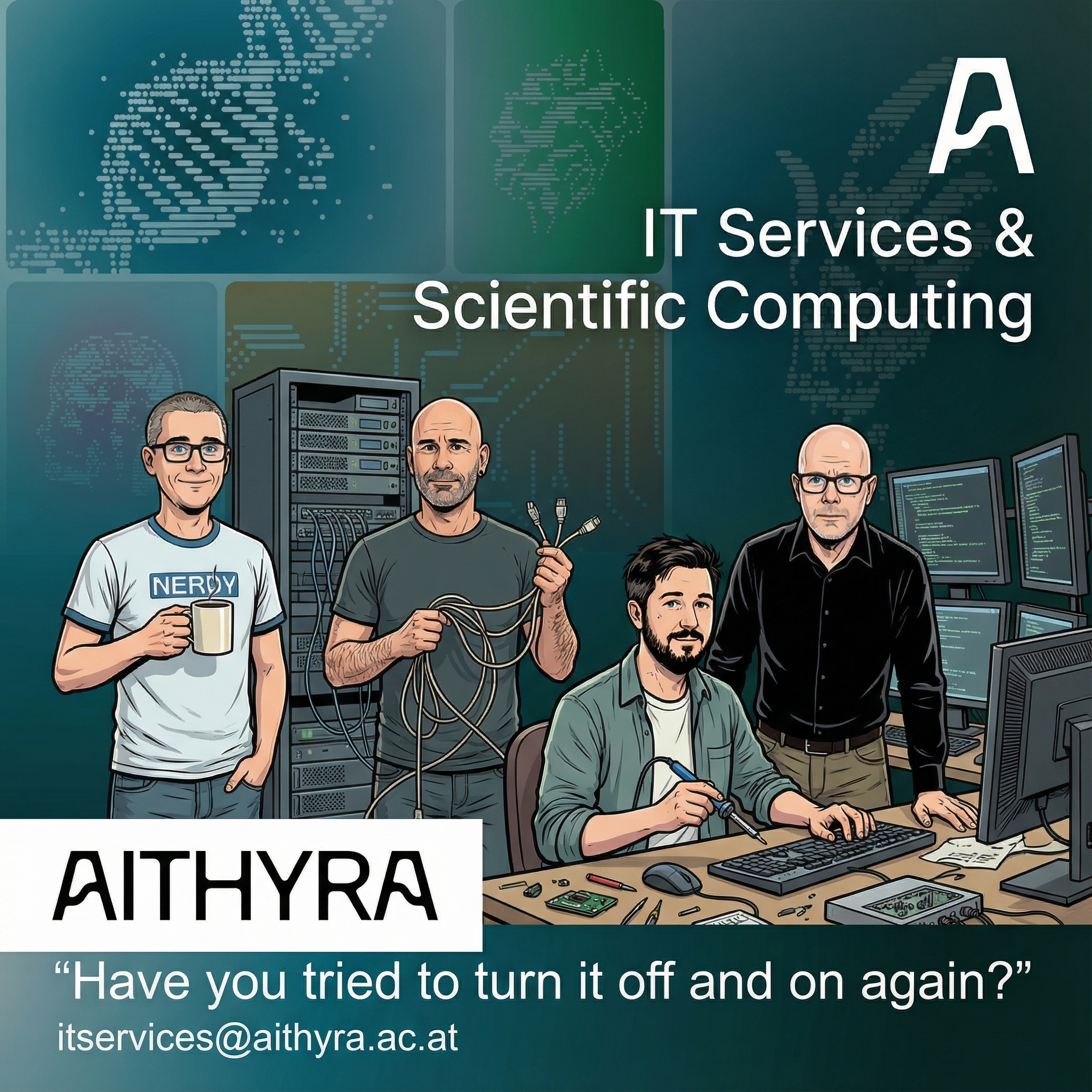
Upload of Logo, AITHYRA name logo, “#AITHYRA Colors.txt”, Photos and Elements from Corporate Design page
Prompt:
Create a nice Poster for our “IT Services & Scientific Computing” by using the AITHYRA colors - all 4 persons as the teammembers as well add the AITHYRA A (top right somewhere) and bottom left the AITHYRA wording. Also use - very sparse - some elements from the elements image. Only use elements very sparse. For all "normal" Text use Arial - and ensure the poster looks as professional designed as possible. Don't add any names to the images of the persons don't add any elements which don't come from the elements image!

Try to change the images slightly, so they appear as members of the British TV show "IT Crowd", but all four should still be recognized. Could be comic style!

Add at the bottom: "Have you tried to turn it off and on again?" and the contact email: "itservices@aithyra.ac.at".Result:
Happy Prompting!